Posted on Leave a comment

Domain Names Defined

In this episode, we break down the essentials of domain names and why they’re key to building your online presence. We explore the differences between generic Top-Level Domains (gTLDs) like .com and country-code TLDs (ccTLDs) like .ca, explaining their purposes and audiences. You’ll also learn about URL redirects and name servers (NS records) and how these tools seamlessly manage website traffic and email routing. Plus, we highlight SiteSculpt’s budget-friendly domain services, which include the flexibility to modify DNS records at no extra cost. Tune in to get a clear understanding of domains and how to make them work for you!

Website: sitesculpt.site

Youtube:
https://youtu.be/Y-daqh3gWro

Rumble:
https://rumble.com/v66p4tg-domain-names-defined.html?mref=4ez0pd&mc=c644m

Dailymotion:
https://dai.ly/k6bz9ai4pzLSkXCefvG

Posted on Leave a comment

Computational Photography in Smartphones: How Software Outsmarted Optics

Introduction: The Miracle in Your Pocket

How can a device as thin as a slice of bread capture vibrant sunset landscapes, crisp night shots, and DSLR-style portraits with softly blurred backgrounds?

Physics tells us that great photography requires large lenses to gather light and massive image sensors to capture fine detail. Yet, the tiny camera modules jammed into modern smartphones defy these traditional optics laws. The secret doesn’t lie in glass or mirror boxes; it lies in algorithms.

Welcome to the era of computational photography in smartphones. Through digital math, hardware integration, and software engineering, mobile devices process image data in ways physical cameras never could.Software has replaced heavy glass elements, turning mobile devices into some of the most capable imaging platforms ever created.

What is Computational Photography?

At its core, computational photography refers to digital image capture and processing techniques that use algorithms rather than optical physics alone to create or enhance a photograph.

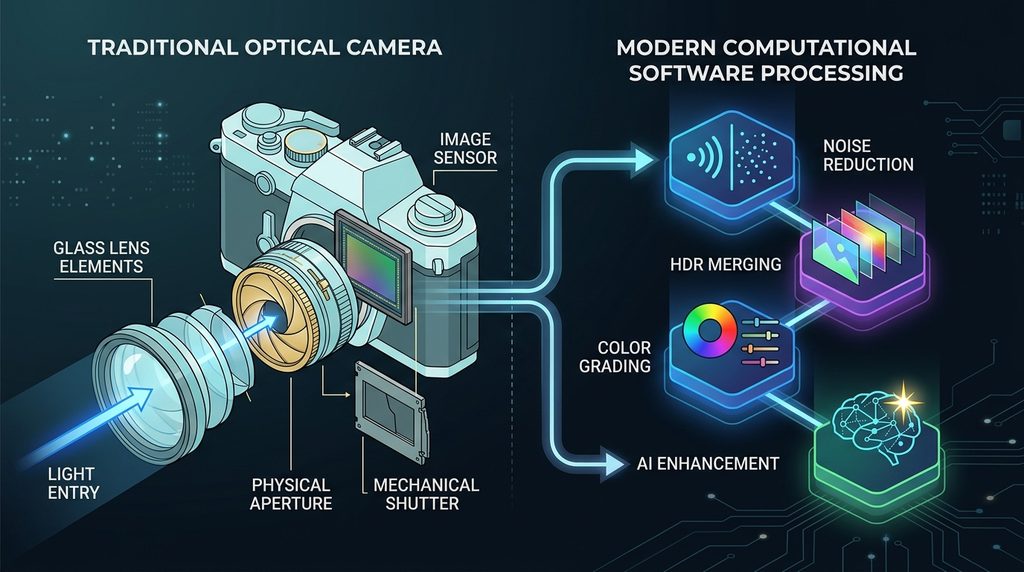
In a traditional camera, light passes through a glass lens, hits a sensor, and saves directly as an image file with minimal digital intervention. In contrast, smartphone camera software treats the light coming through the lens as raw raw data—an initial building block rather than the final picture.

Key Takeaway: Traditional photography relies on hardware optics (gathering physical light through glass). Computational photography relies on software computation (calculating, combining, and enhancing image data digitally).

Instead of taking a single picture when you tap the shutter button, a smartphone running modern computational photography algorithms captures a rapid burst of multiple images, analyzes every pixel in real-time, and merges the best parts of each frame into a single exposure.

How Computational Photography Works Inside a Smartphone

The journey from pressing “shoot” to viewing a finished picture takes less than a second, but it involves millions of mathematical calculations across specialized processing hardware.

[ Light Input ] ➔ [ Image Sensor ] ➔ [ Burst Capture Buffer ] ➔ [ ISP & NPU Alignment ] ➔ [ Final Composite Image ]

Step 1: The Sensor Capture Phase

When you open your camera app, your smartphone sensor is already constantly capturing frames into a temporary memory buffer. By the time your finger taps the shutter button, the camera has already recorded several frames before, during, and after the click.

Step 2: Multi-Frame Burst Processing

Instead of relying on one exposure, smartphone image processing uses multi-frame fusion.The camera records a sequence of shots taken at varying exposure levels—some dark to capture highlight details, some bright to extract shadow detail, and some in-between for accurate color.

Step 3: ISP and NPU Hardware Pipeline

The raw frame data routes into two crucial silicon chips inside your phone’s processor:

  • Image Signal Processor (ISP): Handles low-level raw image tasks like color correction, demosaicing (converting raw sensor data into red, green, and blue pixels), white balance adjustments, and noise reduction.
  • Neural Processing Unit (NPU): Dedicated silicon designed for AI photography tasks. It uses deep learning algorithms to detect subjects, segment backgrounds, reconstruct missing details, and optimize local exposure.

The system aligns every frame to fix micro-hand-shakes, discards blurry pixels, and stitches the best visual elements into one balanced image file.

The Role of AI and Machine Learning in Smartphone Cameras

Artificial intelligence is no longer an optional camera extra; AI photography forms the core backbone of smartphone camera technology.Modern camera apps use trained machine learning models to analyze scene geometry before you even press the shutter.

Raw Sensor Input ➔ Machine Learning Scene Model ➔ Object Segmentation ➔ Targeted Exposure / Color Polish

Semantic Segmentation and Scene Recognition

Older camera hardware applied edits uniformly across an entire image. Modern AI camera software uses semantic segmentation—breaking down an image into individual object categories like sky, skin, fabric, foliage, or architecture.

Image LayerAI Semantic Action
Human SubjectPreserves natural skin tone, brightens eyes, reduces shadow noise.
Sky / CloudsLowers highlights, enhances blue tone gradients, sharpens cloud edge detail.
Foliage / PlantsSharpens leaf edges without adding harsh digital artifacts.
BackgroundAdjusts global contrast while isolating subject lighting.

Generative Detail and AI Zoom

When zooming past a phone’s physical focal length, standard digital zoom stretches existing pixels, making photos look blurry and pixelated. Computational AI camera zoom uses neural networks trained on millions of high-resolution images to predict and reconstruct fine details—like fabric weaves, tree bark, or distant signs—turning digital crop zoom into clear images.

Key Features Powered by Computational Photography

Every modern flagship feature rely on software multi-frame merging.

Dynamic Range Mastery: HDR Photography

Traditional single-shot camera captures struggle when a scene features both bright sunlight and dark shadow pockets. HDR photography (High Dynamic Range) solves this issue by shooting rapid exposure variations:

  1. Underexposed framescapture highlights (e.g., bright sky, direct sun flare) without blowout.
  2. Overexposed framespull clear shadow detail out of dark regions.
  3. Mid-exposure frames maintain natural mid-tone color reproduction.

Computational software merges these frames pixel-by-pixel, delivering photos with evenly lit details from edge to edge.

Defying the Dark: Night Mode

Physical camera sensors require large surface areas or long exposures to gather ambient light at night. Night mode brings that functionality to tiny mobile camera sensors through computational alignment:

  • The phone captures 10 to 30 low-exposure frames over 1–5 seconds.
  • Algorithms calculate hand tremor movement between frames and realign the stack.
  • Random low-light grain and digital noise are mathematically isolated and purged.
  • Dark frames merge to accumulate ambient light without blowing out highlights or adding motion blur.

Digital Depth: Portrait Mode and Bokeh

DSLR and mirrorless lenses produce smooth background blur (bokeh) using wide optical apertures. Smartphone camera lenses are too tiny to create shallow depth-of-field naturally.

Portrait mode mimics this optical effect mathematically:

  • Dual-lens systems or stereo-vision software generate a precise 3D depth map measuring distances between objects and the lens.
  • AI algorithms segment foreground subjects (including tricky stray hair strands) away from background objects.
  • A realistic Gaussian or optical blur mask applies strictly to background depth layers, recreating true optical bokeh.

Computational Cleanliness: Noise Reduction and Sharpening

Tiny smartphone image sensors generate high digital noise in low light. Rather than smoothing photos into blurry shapes, smartphone image processing cross-references successive video frames.Static pixels retain sharpness, while random grain patterns across frames are identified and scrubbed away automatically.

Traditional Photography vs. Computational Photography

While both approaches capture visual memories, their underlying philosophies differ entirely:

Feature / TraitTraditional PhotographyComputational Photography
Primary DriverPhysical optics, glass elements, large sensor sizeCode algorithms, multi-frame bursts, processing power
Capture StyleSingle instantaneous physical shutter exposureMulti-frame dynamic exposure fusion
Form FactorBulky camera bodies and interchangeable lensesUltra-slim pocket devices
Post-ProcessingManual editing required in RAW processing appsInstant automated processing in milliseconds
Low-Light CaptureRequires physical tripods or high ISO sensitivity settingsMulti-frame handheld stabilization algorithms
Depth BlurPure physical lens optics and aperture geometryAI-generated spatial depth mapping and blur masks

Why Computational Photography Matters for Smartphones

Physics imposes strict size boundaries on hardware innovation. A smartphone cannot fit a 50mm f/1.2 glass lens or a full-frame sensor inside a body under 8mm thick without creating an unusable camera bump.

Hardware Limits (Tiny Lenses & Small Sensors)
                     +
Computational Software (Burst Fusion + AI Neural Engines)
                     =
DSLR-Class Dynamic Range & Clarity in Your Pocket

Software breaks through hardware constraints.By swapping heavy glass for raw computational horsepower, smartphone photography technology delivers image quality that challenges dedicated professional gear in everyday shooting environments.

Daily Examples: Computational Photography in Action

You use computational photography algorithms constantly without realizing it:

  • Group Photos Where Everyone Is Smiling: Camera software picks open eyes and smiles across sequential burst shots, merging them into one optimal group frame.
  • Sunset Horizon Shots:Shooting directly toward bright light captures both golden sky gradients and shadow foreground details simultaneously.
  • Concert Videos and Photos:Bright stage spotlights don’t wash out performer faces, while dark crowds remain visible and detailed.
  • Action Zoom Shots:Watching sports from stadium seats and zooming in 10x yields sharp, readable jersey text via generative detail reconstruction.

Advantages and Limitations of Computational Photography

Advantages

  • Pro Quality without Bulk: Capture high-grade images without carrying heavy lenses or camera gear.
  • Zero-Effort Perfection: Instant lighting balance, auto-focus, and colors mean anyone can shoot clear photos right away.
  • Low-Light Magic:Handheld low-light capture outperforms single exposure settings on traditional camera sensors.
  • Continuous Updates:Your smartphone camera system improves over time via software over-the-air updates.

Limitations

  • Over-Processed Aesthetics:High contrast, overly sharpened edges, or plastic-looking skin can make photos feel artificial.
  • Edge Artifacts:Portrait mode depth maps can miscalculate fine object borders like thin glass stems, dog fur, or loose hair strands.
  • Thermal and Battery Strain:Multi-frame AI processing places high power demands on mobile processors during long photo shoots.
  • Motion Artifacts (“Ghosting”):Fast-moving subjects across multi-frame HDR captures can leave faint trailing outlines if alignment algorithms struggle.

The Future of Computational Photography in Smartphones

As mobile chips feature more powerful dedicated NPUs, computational photography in smartphones is moving into real-time computational video processing and interactive generative editing.

Multi-Frame Still Processing ➔ Real-time Computational Video ➔ Generative AI & Interactive Spatial Scene Edits
  1. Real-Time 4K Computational Video:Extending complex multi-frame HDR and Night Mode algorithms across 60 video frames per second.
  2. Generative Relighting and Angle Adjustment:AI tools that let users move lighting sources or slightly adjust camera angles after capturing a shot.
  3. Generative Element Removal and Fill:Cleanly removing background distractions and reconstructing underlying textures on-device instantly.
  4. Authenticity Certification:Standardized cryptographic watermarking to help distinguish unaltered computational real photos from heavily modified generative AI imagery.

Conclusion: Software is the New Lens

The leap in mobile photography quality over the last decade wasn’t driven by bigger optical lenses; it was forged through code.Computational photography in smartphones bridges the gap between hardware physics and user expectations.

By using machine learning, multi-frame exposure processing, and neural network depth mapping, smartphones turn tiny optical components into high-grade image engines.As processors become faster and algorithms smarter, software will continue pushing the boundaries of what mobile devices can capture.

Frequently Asked Questions (FAQ)

What is computational photography in smartphones?

Computational photography in smartphones refers to software algorithms, machine learning, and hardware processing that enhance, adjust, and merge raw photo data to produce higher-quality photos than small camera optics could capture on their own.

Does computational photography replace traditional camera lenses?

It doesn’t replace physical glass entirely, but it offsets hardware physical limits.Small camera lenses still gather physical light, but computational algorithms enhance color, lighting, detail, and focus digitally.

How does Night Mode work without a tripod?

Night mode captures multiple short exposures over a few seconds.Algorithms realign these frames to correct hand shaking, purge digital noise, and merge light data into a bright, clear photo.

Why do smartphone photos sometimes look artificial or over-processed?

Over-processing happens when algorithms apply aggressive edge sharpening, high local contrast, or strong noise reduction.Tuning these software settings balances natural tone against crisp clarity.

What is the difference between an ISP and an NPU in mobile photography?

The Image Signal Processor (ISP) handles basic hardware tasks like color conversion, white balance, and noise cleanup.The Neural Processing Unit (NPU) powers AI tasks like object recognition, depth estimation, portrait blur, and semantic segmentation.

Can traditional DSLR or mirrorless cameras use computational photography?

Some modern mirrorless cameras feature basic computational modes like focus stacking or pixel-shift resolution. However, smartphones lead in this tech because their mobile processors house far more powerful NPUs designed for heavy software execution.

Posted on Leave a comment

Moving Beyond rigid IVRs: A Deep Dive into RingCentral’s AI Receptionist

In business communications, few sounds are as costly as a ringing phone that goes unanswered—or worse, a caller hanging up out of frustration while stuck in a complex phone menu (“Press 1 for Sales, Press 2 for Billing…”).

Traditional phone systems, standard Interactive Voice Response (IVR) menus, and call queues have long served as the front door for business inquiries. However, they rely on rigid rules and manual button presses that often alienate modern callers. RingCentral’s AI Receptionist represents a fundamental shift away from simple call routing toward intelligent, multi-channel customer engagement.

Here is an overview and review of RingCentral’s AI Receptionist product, exploring how it elevates phone communication, its core capabilities, pricing structure, and practical use cases.

What Sets RingCentral AI Receptionist Apart?

Traditional auto-attendants act like traffic cops: they direct traffic based on pre-programmed inputs. RingCentral AI Receptionist, by contrast, operates like a knowledgeable front-desk assistant that can engage in natural, human-like, multilingual conversations.

Rather than simply parking callers in a queue or transferring them to a busy voicemail, the AI Receptionist can fulfill requests directly during the call.

┌─────────────────────────────────────────────────────────┐
│              RingCentral AI Receptionist                │
├──────────────────────────┬──────────────────────────────┤
│  Natural Voice / AI      │  Answers FAQs & Inquiries    │
│  Contextual Call Routing │  Schedules Appointments      │
│  CRM Integration         │  Captures & Logs Leads       │
└──────────────────────────┴──────────────────────────────┘

Key Features & Capabilities

  1. Natural Interaction (No Rigid IVR Menus): Callers speak naturally instead of listening through a list of numbered options. The AI understands intent, keywords, and context, providing instant responses in multiple languages.
  2. Instant Setup & Knowledge Ingestion: Training the AI does not require extensive IT support. Businesses can quickly train the receptionist by feeding it content directly from their website, FAQ pages, or custom reference documents.
  3. Appointment Scheduling & CRM Sync: The AI connects directly to calendar tools to book, reschedule, or manage appointments in real time. It also integrates natively with platforms like Salesforce, HubSpot, and Zoho to capture intake details and log lead information automatically.
  4. Context-Aware Transfers: When a call does need human escalation, the AI transfers the customer along with full conversational context, ensuring staff members don’t have to ask callers to repeat themselves.
  5. 24/7 Availability & Multi-Call Handling: It handles high volume continuously—including after-hours, weekends, and peak overflow times—without callers encountering a busy signal or dying in a queue.
  6. Built for Regulated Industries: It supports security standards required for industries like healthcare (HIPAA support), legal, real estate, and financial services, utilizing encryption, audit logging, and strict access controls.

Pricing & Deployment Models

RingCentral offers the AI Receptionist as both an upgrade to existing setups and a flexible entry point for businesses using non-RingCentral phone infrastructure.

Plan TypeMonthly Base PriceIncluded UsageOverage RateBest For
RingEX Add-On$39 / month100 minutes included$0.50 / minExisting RingCentral users extending their unified communications system.
Standalone Plan$49 / month100 minutes included$0.50 / minBusinesses using third-party/legacy phone systems wanting smart call handling.

Note: Both options include a 14-day free trial to test workflows and call routing setup.

Real-World Impact Across Industries

Because the AI Receptionist extends beyond simple transfers, its utility varies dynamically across sectors:

  • Healthcare: Handles preliminary patient intake questions, answers common operational FAQs, and dispatches appointment follow-up texts while maintaining privacy standards.
  • Legal Services: Screens prospective clients by asking custom qualification questions, logging details into CRM tools, and transferring high-value cases to the appropriate attorney.
  • Real Estate: Manages inbound buyer calls on property listings, captures lead contact information, and schedules property showings on agent calendars automatically.

Final Verdict

RingCentral’s AI Receptionist bridges the gap between traditional telecom routing and automated customer support. By equipping the front line of your phone system with natural language comprehension, CRM syncing, and automated scheduling, it transforms missed calls from lost revenue into actionable business leads.

For small businesses needing round-the-clock coverage, or larger organizations looking to reduce call queue abandonment, it offers a pragmatic, high-value alternative to standard phone trees.

Posted on Leave a comment

AI-Powered Business Communications: How RingCentral Is Redefining the Way Companies Connect

Business communication is no longer just about making phone calls or joining video meetings. Customers expect fast answers, employees need simpler ways to collaborate, and organizations are looking for technology that can handle more work without adding unnecessary complexity.

Artificial intelligence is accelerating that transformation.

Today, AI can help businesses answer incoming calls, capture information, summarize conversations, assist employees, analyze customer interactions, and automate routine tasks. The result is a new approach to business communication—one where technology does more than connect people; it actively helps organizations move conversations toward outcomes.

RingCentral is bringing these capabilities together through its AI-powered communications portfolio, which includes business communications, AI agents, contact center solutions, meetings, and conversation intelligence. RingCentral says its platform is used by more than 600,000 businesses worldwide.

What Is AI-Powered Business Communication?

AI-powered business communication combines traditional communication tools—such as business phone systems, messaging, meetings, and contact centers—with artificial intelligence.

Instead of requiring employees to manage every step manually, AI can assist with tasks such as:

  • Answering routine customer calls
  • Understanding what callers need
  • Routing conversations to the appropriate person or team
  • Scheduling appointments
  • Capturing lead information
  • Creating call notes and meeting summaries
  • Translating messages and conversations
  • Analyzing customer sentiment and conversation patterns
  • Providing insights for sales and customer-service teams

This does not necessarily mean replacing human employees. A more practical use of AI is to remove repetitive work so people can spend more time on decisions, relationships, and complex customer needs.

Why Businesses Are Moving Beyond Traditional Phone Systems

Traditional business phone systems can handle essential functions such as call routing, voicemail, extensions, and automated menus. But modern customer expectations have raised the bar.

A customer who calls a business may want an answer immediately, schedule an appointment, receive information by text, or speak with a specialist. If the business relies entirely on manual processes, even a simple request can consume valuable employee time.

AI introduces another option.

For example, an intelligent system can understand a caller’s request, answer a common question, collect relevant information, and transfer the conversation when human assistance is necessary.

The objective is straightforward: make every customer interaction easier to handle and every employee interaction more productive.

RingCentral RingEX: Connecting Everyday Business Communications

RingCentral’s RingEX brings core communication functions into a unified platform. According to RingCentral, RingEX combines business calling, messaging, SMS, video meetings, and fax, while supporting integrations with more than 500 applications.

That unified approach can reduce the need for employees to move between disconnected communication tools.

RingEX also incorporates AI capabilities designed to support everyday work. These include real-time note-taking, meeting summaries, message composition, transcription, and translation features.

For employees, the value is less about having another AI tool and more about having AI available where communication is already happening.

Less time documenting conversations

Meetings and calls often generate important information—decisions, responsibilities, deadlines, and follow-up tasks.

AI-powered notes and summaries can help capture those details without requiring employees to manually document every conversation.

Easier collaboration

When calling, messaging, meetings, and other communication functions are accessible through one platform, teams can move between communication methods without losing the broader context.

Better support for distributed teams

Cloud-based communications allow employees to stay connected across devices and locations, helping organizations support hybrid, remote, and geographically distributed workforces.

RingCentral AI Receptionist: Turning Missed Calls Into Opportunities

One of the clearest examples of AI applied to business communication is RingCentral AI Receptionist.

RingCentral describes AI Receptionist as a 24/7 intelligent front desk that can answer calls, respond to routine questions, schedule appointments, capture leads, send text follow-ups, and route callers to the appropriate team.

This can be particularly valuable for businesses where an unanswered call could mean a lost customer.

Instead of forcing callers through rigid menu systems, AI Receptionist is designed around natural-language interactions. Businesses can provide information from sources such as their website, FAQs, and uploaded documents so the AI can use that information when handling common inquiries.

What can an AI receptionist handle?

Depending on configuration and integrations, RingCentral says AI Receptionist can:

  • Answer calls around the clock
  • Respond to frequently asked questions
  • Collect lead and intake information
  • Schedule and reschedule appointments
  • Send SMS follow-ups
  • Route calls based on caller intent and other information
  • Provide a summary when transferring a caller to a human employee
  • Connect with business systems such as CRM, scheduling, and other applications
  • Support multilingual interactions

These capabilities can help businesses maintain a responsive front desk without requiring employees to manually answer every routine inquiry.

RingCX: Bringing AI Into the Contact Center

For organizations managing larger volumes of customer interactions, the challenge goes beyond answering calls.

Contact center leaders need visibility into customer conversations, agent performance, service quality, and operational efficiency.

RingCentral’s RingCX is positioned as an AI-first contact center platform supporting voice and more than 20 digital channels. Its capabilities include AI-assisted agent and supervisor workflows, conversation analytics, workforce engagement, reporting, and customer interaction management.

RingCX also integrates with RingEX, allowing organizations to connect contact center and broader business communications workflows within the RingCentral environment.

Helping agents focus on customers

Customer-service employees frequently have to listen, type notes, search for information, follow procedures, and maintain the conversation simultaneously.

AI assistance can reduce some of that administrative burden.

RingCentral highlights capabilities such as agent assistance, supervisor assistance, AI-powered quality management, and conversation analytics within RingCX.

The potential benefit is simple: give agents more support during and after interactions while giving managers better visibility into what is happening across the contact center.

Conversation Intelligence: Turning Calls Into Insights

Customer conversations contain valuable information, but reviewing every interaction manually is difficult at scale.

AI-powered conversation analysis can help organizations identify patterns across large numbers of calls.

RingCentral’s AI Conversation Expert is designed to record and summarize sales conversations, help keep CRM information current, and provide insights and coaching opportunities.

For sales organizations, this can provide another way to understand:

  • Common customer objections
  • Topics that repeatedly arise during sales calls
  • Conversation quality
  • Coaching opportunities
  • Customer needs and interests
  • Potential areas for improvement

Rather than treating calls as isolated events, businesses can use conversation data to identify broader trends.

The Real Advantage: Automating the Entire Conversation Journey

The most interesting development in business communications is not any individual AI feature.

It is what happens when multiple AI capabilities work together.

Consider a potential customer journey:

Step 1: The customer calls.
An AI Receptionist answers immediately, even outside normal business hours.

Step 2: The customer’s request is understood.
Instead of navigating a complicated phone tree, the caller can explain what they need.

Step 3: A simple request is handled automatically.
The AI can answer a common question, collect information, schedule an appointment, or provide a requested follow-up by text.

Step 4: A complex request reaches a human.
If the issue requires an employee, the conversation can be routed to the appropriate person with relevant context.

Step 5: The interaction becomes data.
Conversation intelligence and analytics can help the organization understand what happened and identify potential improvements.

This is the broader promise of AI-powered communications: automate what can be automated, assist people where human involvement matters, and analyze interactions to improve future performance.

AI Should Enhance Human Communication, Not Complicate It

Technology adoption can fail when employees are given more tools but not better workflows.

That is why integration matters.

RingCentral’s platform is designed to bring communication and AI capabilities into a connected environment, while also supporting integrations with business applications. RingEX, for example, advertises integrations with more than 500 applications, while RingCX provides additional integration and API capabilities for contact center environments.

For businesses evaluating AI communications technology, the key question should therefore be more than, “Does it have AI?”

A better question is:

Can the AI fit naturally into the way our people and customers already communicate?

What Businesses Should Consider Before Adopting AI Communications

Before implementing an AI-powered communications platform, organizations should evaluate several areas.

1. Customer experience

Does the technology make it easier for customers to get help, or does it create another obstacle?

2. Human handoffs

Can customers reach a real person when they need one? And does the employee receive enough context to avoid making the customer repeat everything?

3. Integration

Can the communications platform connect with CRM, scheduling, collaboration, and other business systems?

4. Scalability

Can the solution support the organization as call volumes, locations, employees, and customer interactions increase?

5. Analytics

Can the business learn from its conversations rather than simply store them?

6. Security and responsible AI

Businesses should also understand how customer and employee data is handled. RingCentral states that it does not use customer data to train its AI models and highlights privacy, security, transparency, and compliance as part of its AI approach. Organizations should still review the applicable product documentation, configurations, and contractual terms for their specific use case.

The Future of Business Communications Is AI-Assisted

Business communication is evolving from a system that simply connects people into an intelligent layer that can help manage the interaction itself.

AI can answer routine questions. It can assist employees. It can summarize meetings. It can analyze conversations. It can help contact centers understand customer behavior. And increasingly, AI agents can perform specific communication-driven tasks from beginning to end.

RingCentral is building toward this model with its portfolio of RingEX, RingCX, AI Receptionist, AI Conversation Expert, and other AI capabilities.

For organizations considering their next communications investment, the opportunity is not simply to replace an outdated phone system.

It is to rethink what business communication can accomplish.

Ready to Explore AI-Powered Business Communications?

Whether your priority is reducing missed calls, improving employee productivity, strengthening customer service, modernizing your contact center, or gaining more insight from conversations, AI can become a practical part of your communications strategy.

Explore RingCentral’s AI-powered communications solutions to see how business calling, messaging, meetings, contact center capabilities, and AI can work together.

Visit RingCentral.com to explore the platform, compare solutions, and discover how AI-powered communications can help your organization create better customer and employee experiences.

Sources and editorial note

This article is original editorial content written specifically for publication. It does not reproduce RingCentral’s website copy. Product names, capabilities, and current platform claims were checked against RingCentral’s official website and supporting product pages as of August 2026.

Posted on Leave a comment

Google Drive: Streamlining Content Delivery

This blog post from redimedia.site champions Google Drive as a superior solution for content delivery. It highlights Google Drive’s versatility in handling diverse file types, ease of access from any device, and robust collaboration features. The post also emphasizes its version control, ample storage, and strong security measures. Ultimately, the article positions Google Drive as an efficient and secure platform for streamlining content sharing in various collaborative projects.

n this episode, we dive into why Google Drive stands out as a top-tier solution for content delivery, inspired by a post from Redimedia.site. We discuss its versatility in managing diverse file types, seamless accessibility across devices, and powerful collaboration tools. From version control to ample storage and strong security measures, we unpack how Google Drive simplifies and secures content sharing for any project. Whether you’re working solo or with a team, this episode highlights why Google Drive is the go-to platform for efficient and streamlined collaboration.

YouTube: https://youtu.be/ncf_RUorBFM

Rumble: https://rumble.com/v69j48a-google-drive-streamlining-content-delivery.html

Dailymotion: https://dai.ly/k5iZQ4jkzhazcWCeGKC

Posted on Leave a comment

Top Web Hosting by SiteSculpt

This blog post from redimedia.site, originally authored by SiteSculpt.site, compares different web hosting options. It details the advantages and disadvantages of shared, virtual private server (VPS), and dedicated hosting, emphasizing the importance of considering website needs (traffic, software requirements) when choosing a plan. The post guides readers toward selecting the most suitable hosting solution based on their website’s specific demands and offers assistance via live chat or phone. Ultimately, it aims to help users make an informed decision about web hosting.

In this episode, we break down a blog post from redimedia.site, authored by SiteSculpt.site, that compares the pros and cons of shared, VPS, and dedicated web hosting options. We discuss how to match hosting plans with your website’s needs—whether it’s traffic volume or software requirements—and provide tips for making the best choice. Plus, learn how to access expert guidance through live chat or phone support. Tune in to gain valuable insights and make informed decisions about your web hosting journey!

Website: www.sitesculpt.site

Youtube: https://youtu.be/vxsxIorInFE

Rumble: https://rumble.com/v6921l7-top-web-hosting.html

Dailymotion: https://dai.ly/k6HFtlz8FcapU3CdNuc

Posted on Leave a comment

SiteSculpt Small Hosting Plan Review

redimedia’s website promotes SiteSculpt’s Small Hosting Plan, highlighting its affordability and features. The plan offers unlimited disk space and traffic, support for up to five domains, a one-click installer for 40+ scripts, and a multilingual control panel. Additional benefits include unlimited databases and email accounts, a free website builder, and a 99.9% uptime guarantee. A 30-day free trial is available, requiring no credit card.

In this episode, we spotlight SiteSculpt’s Small Hosting Plan, promoted on redimedia’s website, as an affordable and feature-packed web hosting solution. The plan includes unlimited disk space and traffic, support for up to five domains, a one-click installer for over 40 scripts, and a multilingual control panel. Additional perks like unlimited databases, email accounts, a free website builder, and a 99.9% uptime guarantee make it a standout option. Plus, there’s a 30-day free trial—no credit card needed. Tune in to learn why this plan might be the perfect fit for your hosting needs!

Website: sitesculpt.site

Youtube: https://youtu.be/MESJ7C5y3zM

Rumble: https://rumble.com/v69tf61-sitesculpt-small-hosting-plan-review.html

Dailymotion: https://dai.ly/k6SEFngw5urHEtCf376

Posted on Leave a comment

The Ultimate Collection of Free Mini Web Apps for Everyday Productivity

URL: https://redimedia.site/webapps/

Technology doesn’t always have to be complex to be useful. Sometimes, the simplest tools solve everyday problems better than feature-heavy software. That’s the philosophy behind redimedia Web Apps—a growing collection of lightweight, browser-based applications that are free, fast, and accessible whenever you need them.

Whether you’re a student organizing assignments, a professional managing daily tasks, a business owner creating QR codes, or simply someone looking for quick online utilities, these mini web apps provide practical solutions without requiring downloads or complicated installations.

Instead of opening multiple websites or installing separate applications, you can access everything from one convenient location.

Why Use Mini Web Apps?

Mini web apps focus on doing one thing exceptionally well. Rather than overwhelming users with countless features, they provide quick access to tools that solve common problems efficiently.

Some of the biggest advantages include:

  • No software installation required
  • Accessible on desktop, tablet, and mobile devices
  • Fast loading times
  • Simple and intuitive interfaces
  • Free to use
  • Perfect for everyday productivity

Whether you’re at home, at work, or on the go, browser-based tools allow you to accomplish tasks in seconds.


Explore the RediMedia Mini Web Apps

🕒 Digital Clock

Need a clean and accurate digital clock while working or studying?

The Digital Clock provides a simple time display that’s perfect for:

  • Keeping track of work sessions
  • Monitoring meeting times
  • Studying with time awareness
  • Office dashboards
  • Classroom displays

Sometimes the simplest tools are the most useful. Keeping a dedicated clock open helps improve time management without unnecessary distractions.


💰 Loan Calculator

Financial planning becomes much easier when you know exactly what your monthly payments will look like.

The Loan Calculator helps users estimate loan repayments based on loan amount, interest rate, and repayment period.

Perfect for:

  • Personal loans
  • Car loans
  • Home financing
  • Budget planning
  • Financial comparisons

Instead of manually calculating figures, users receive instant estimates that make financial decision-making easier.


📱 QR Code Generator

QR codes have become an essential part of modern communication.

With the QR Code Generator, users can quickly create QR codes for:

  • Websites
  • Business pages
  • Contact information
  • Social media profiles
  • Events
  • Online portfolios

Businesses can use QR codes for marketing materials, restaurants can add them to menus, teachers can share learning resources, and content creators can simplify access to their online platforms.

Creating a QR code takes only seconds.


💬 Quote Machine

Need a little inspiration during the day?

The Quote Machine delivers motivational and thought-provoking quotes that can help spark creativity, encourage positive thinking, or simply brighten your mood.

Great for:

  • Daily motivation
  • Social media inspiration
  • Creative brainstorming
  • Morning routines
  • Team meetings

Sometimes a single quote can change your perspective and inspire your next big idea.


❌⭕ Tic Tac Toe

Not every web app has to be about productivity.

Tic Tac Toe offers a classic game that provides a quick mental break during work or study sessions.

It’s perfect for:

  • Relaxing between tasks
  • Friendly competitions
  • Kids learning strategy
  • Quick entertainment
  • Passing short breaks

Short breaks can actually improve concentration, making simple games surprisingly beneficial during long workdays.


Tasks Pro

Productivity begins with organization.

Tasks Pro helps users manage their daily responsibilities in a simple and effective way.

You can use it to:

  • Create daily to-do lists
  • Track important reminders
  • Organize projects
  • Prioritize work
  • Stay focused

Rather than relying on sticky notes or remembering everything mentally, Tasks Pro gives users a straightforward way to keep everything organized.

Small improvements in organization often lead to significant gains in productivity.


🔤 Word Scrambler

Whether you’re creating games, educational activities, or simply having fun, the Word Scrambler offers endless possibilities.

Useful for:

  • Teachers creating classroom activities
  • Parents helping children learn
  • Puzzle enthusiasts
  • Vocabulary practice
  • Party games

It’s both educational and entertaining, making it suitable for users of all ages.


Who Can Benefit from These Web Apps?

Students

Students can use Tasks Pro for assignment management, the Digital Clock for study sessions, the Loan Calculator for budgeting education expenses, and the Word Scrambler for language learning.

Professionals

Professionals benefit from staying organized, generating QR codes for presentations or business cards, and keeping track of time throughout the workday.

Small Business Owners

Business owners can create QR codes for marketing campaigns, estimate financing with the Loan Calculator, and organize projects using Tasks Pro.

Teachers

Teachers can incorporate the Word Scrambler into classroom activities, use motivational quotes to engage students, and generate QR codes for digital learning resources.

Content Creators

Creators can generate QR codes linking to videos, portfolios, or social media accounts while using the Quote Machine for creative inspiration.


Why Browser-Based Tools Are Becoming More Popular

Modern users increasingly prefer web applications because they eliminate many of the barriers associated with traditional software.

Instead of downloading applications, creating accounts, or updating programs, users can simply open a browser and start working immediately.

Benefits include:

  • Cross-device compatibility
  • Instant accessibility
  • Faster workflows
  • Lower storage requirements
  • No installation hassles

This makes mini web apps ideal for users who value speed and convenience.


Build Your Own Productivity Toolkit

One of the best ways to maximize these tools is to bookmark the ones you use most often.

For example:

Morning Routine:

  • Open the Digital Clock
  • Check Tasks Pro
  • Read a motivational quote

Business Workflow:

  • Generate QR codes
  • Calculate financing
  • Manage daily tasks

Study Session:

  • Use the Digital Clock
  • Organize assignments
  • Practice vocabulary with Word Scrambler

Entertainment Break:

  • Play a quick game of Tic Tac Toe
  • Refresh with an inspirational quote

Combining multiple mini web apps creates a personalized productivity system tailored to your daily needs.


Why Choose RediMedia Web Apps?

The goal isn’t to replace full-featured software.

Instead, RediMedia focuses on providing practical tools that solve everyday problems quickly and efficiently.

Each application is designed to be:

  • Fast
  • Lightweight
  • Easy to use
  • Accessible anywhere
  • Free to enjoy

Whether you need to calculate a loan, organize your day, generate a QR code, play a quick game, or simply find a little inspiration, you’ll find a tool that’s ready to help.


Frequently Asked Questions

Are these web apps free?

Yes. The redimedia Web Apps collection is free to use directly from your browser.

Do I need to install anything?

No. Everything runs online, so there’s nothing to download or install.

Can I use them on my phone?

Absolutely. Since they’re browser-based, they’re accessible on smartphones, tablets, laptops, and desktop computers.

Which web app is the most popular?

That depends on your needs. The QR Code Generator and Tasks Pro are ideal for productivity, while the Loan Calculator is great for financial planning. The Digital Clock, Quote Machine, Tic Tac Toe, and Word Scrambler each offer their own unique benefits.

Will more apps be added?

As the redimedia collection continues to grow, users can expect additional mini web apps that simplify everyday tasks and improve productivity.


Final Thoughts

Small tools often make the biggest impact. The RediMedia Web Apps collection proves that productivity doesn’t have to be complicated. With practical applications like the Digital Clock, Loan Calculator, QR Code Generator, Quote Machine, Tic Tac Toe, Tasks Pro, and Word Scrambler, you have a versatile toolkit available whenever you need it.

Whether you’re managing work, studying, planning finances, creating content, or simply taking a short break, these browser-based utilities are designed to save time and make daily tasks easier.

Explore the collection, bookmark your favorites, and discover how a few well-designed mini web apps can simplify your everyday digital life.

Posted on Leave a comment

Building Your Brand Online: The Power of a Website

This blog post from redimedia emphasizes the crucial role of a website in modern brand building. It highlights a website’s function as a 24/7 digital storefront, a tool for establishing credibility and trust, and a platform for content marketing and SEO. Furthermore, the post details how websites can generate and nurture leads, facilitate e-commerce, and provide valuable analytics for optimization. Ultimately, the article advocates for a well-designed website as the foundation for a successful online brand presence.

In this episode of the Redimedia Podcast, we dive into the essential role websites play in modern brand building. Discover how your website acts as a 24/7 digital storefront, establishes credibility and trust, and serves as a powerful platform for content marketing and SEO. We also explore how websites can help generate and nurture leads, drive e-commerce success, and deliver valuable analytics to optimize performance. Tune in as we discuss why a well-designed website is the cornerstone of a thriving online brand presence.

Youtube
https://youtube.com/live/gBLLa1nvS3k

Rumble:
https://rumble.com/v68gwf4-building-your-brand-online-the-power-of-a-website.html

Dailymotion:
https://dai.ly/k4M6U36XpGQkm6CeflW

Posted on Leave a comment

SiteSculpt Web Hosting: Affordable Unlimited Web Hosting Unveiled

This blog post from redimedia promotes SiteSculpt web hosting, emphasizing its reliability, speed, security, and customer support. It guides readers through choosing a suitable domain name, highlighting the importance of brand reflection, simplicity, keyword incorporation, and availability checks. The post encourages readers to utilize SiteSculpt’s services to improve their online presence and reach a wider audience. Several calls to action prompt immediate engagement with SiteSculpt’s offerings. The overall message is that a strong online presence is crucial for business success, and SiteSculpt provides the tools to achieve this.

In this episode, we dive into the essentials of building a strong online presence with reliable web hosting. Highlighting the key features of SiteSculpt Web Hosting—reliability, speed, security, and exceptional customer support—we discuss how it can transform your digital footprint. We also guide you through choosing the perfect domain name, covering tips like reflecting your brand, keeping it simple, using relevant keywords, and ensuring availability. With actionable advice and a focus on SiteSculpt’s tools, we explore how their services can help you expand your reach and grow your business. Tune in to discover why a robust online presence is non-negotiable for success and how SiteSculpt can set you up for digital excellence.

Website: sitesculpt.site

Youtube
https://youtube.com/live/Bu5Z2SEYlAA

Rumble:
https://rumble.com/v65z96p-sitesculpt-web-hosting-affordable-unlimited-web-hosting-unveiled.html

Dailymotion:
https://dai.ly/k3YOSZECEeWP1DCefBW