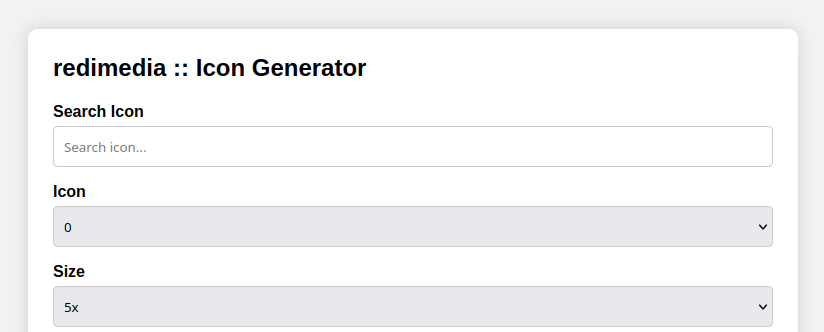
Link: https://redimedia.site/webapps/icon_gen/icon_gen.html
Every website, mobile application, and Progressive Web App (PWA) needs properly sized icons. Whether it’s a favicon displayed in a browser tab, an Android home screen icon, or an Apple touch icon, creating dozens of image sizes manually can quickly become a repetitive and time-consuming task.
Fortunately, browser-based utilities have made this process much easier. One such tool is the redimedia Icon Generator, a lightweight web application designed to generate multiple icon sizes from a single image.
Unlike many online image processing services that require uploads to a remote server, RediMedia’s approach focuses on speed, simplicity, and local browser processing. This makes it an attractive option for developers, designers, students, and hobbyists who want to create application icons without installing additional software.
In this review, we’ll explore its features, usability, strengths, limitations, and whether it’s worth adding to your web development toolkit.
What Is the redimedia Icon Generator?
The redimedia Icon Generator is a browser-based utility that converts a single source image into multiple icon sizes suitable for modern websites and applications.
Instead of manually resizing an image several times in Photoshop, GIMP, or another graphics editor, the tool automates the process. Within a few clicks, users can generate a complete collection of icons for different platforms and download the finished assets.
Its primary goal is simple:
Save developers time while producing consistent, high-quality icons.
This makes it especially useful for:
- Website developers
- Progressive Web App (PWA) creators
- Front-end developers
- Mobile app developers
- UI/UX designers
- Students learning web development
- Freelance web designers
First Impressions
One of the strongest aspects of the redimedia Icon Generator is its minimalist interface.
Rather than overwhelming users with advanced editing tools, filters, or dozens of export settings, it focuses on the essential workflow.
The process is straightforward:
- Upload an image.
- Generate the required icon sizes.
- Download the finished assets.
There is very little learning curve, making the tool approachable even for beginners who have never created favicons before.
For experienced developers, the simplicity is equally appealing because it eliminates unnecessary steps.
Browser-Based Processing: A Major Advantage
Perhaps the most notable feature of the redimedia Icon Generator is that image processing takes place directly in your web browser.
This provides several important benefits.
Improved Privacy
Since the image is processed locally, users don’t have to worry about uploading files to external servers. For organizations handling proprietary logos or branding assets, local processing adds an extra layer of confidence.
Faster Performance
Without server uploads, icon generation feels almost instantaneous.
There are no waiting queues, upload delays, or processing times that often accompany cloud-based image tools.
Reduced Internet Dependency
Once the application loads, much of the processing happens on the client side. This contributes to a responsive experience, especially when working with larger images.
Features That Make the Tool Useful
Although lightweight, the Icon Generator includes several features that make it practical for everyday development work.
Multiple Icon Sizes
Modern web applications require numerous icon dimensions.
Instead of resizing manually, the tool generates multiple versions suitable for different devices and operating systems.
This saves significant development time.
Consistent Image Quality
Manually resizing icons often introduces inconsistencies.
Automated generation ensures every icon is created using the same source image and scaling process, resulting in a more consistent visual identity across platforms.
Beginner-Friendly Design
The interface avoids unnecessary complexity.
There are no advanced image editing menus to navigate before generating icons.
This makes it an excellent utility for beginners, students, and users who simply need icon files without learning professional graphics software.
Lightweight Experience
Unlike some feature-heavy design platforms, the application remains lightweight and responsive.
Pages load quickly, and the overall experience feels uncluttered.
Why Developers Need an Icon Generator
Many first-time developers underestimate how many icon sizes modern websites require.
A typical website may include:
- Browser favicon
- Apple Touch Icon
- Android Chrome icon
- PWA launcher icons
- Windows tile icons
- Manifest icons
- Various high-resolution versions
Creating each manually can become tedious.
An icon generator automates this repetitive work, allowing developers to focus on building their application rather than resizing graphics.
Real-World Use Cases
The redimedia Icon Generator fits naturally into many development workflows.
Launching a New Website
Before deploying a website, developers often need favicons and touch icons.
The tool makes it easy to generate these assets from a single logo.
Building a Progressive Web App
PWAs require multiple icon dimensions for installation across different devices.
Instead of preparing each size manually, the generator streamlines the process.
Mobile Application Branding
Developers creating Android or cross-platform applications frequently need icon variations.
Using one source image ensures consistent branding throughout the application.
Educational Projects
Students learning HTML, CSS, JavaScript, or web development can quickly create professional-looking icons without purchasing commercial software.
Performance
Performance is one of the application’s strongest qualities.
Because everything happens locally, generating icon sets typically feels immediate.
Even on average hardware, there is little noticeable delay between uploading an image and receiving the finished output.
This responsiveness contributes to a smooth user experience.
Strengths
After reviewing the tool, several advantages stand out.
Simple Interface
The design prioritizes usability.
Users can begin generating icons almost immediately.
Fast Processing
Local browser processing minimizes waiting time.
Privacy-Friendly
Images remain on the user’s device rather than being uploaded to external servers.
No Software Installation
Everything works directly from the browser.
There is no need to install desktop applications or browser extensions.
Time Saving
Generating multiple icon sizes manually can take several minutes—or even longer when adjustments are required.
Automation dramatically reduces this workload.
Areas for Improvement
While the Icon Generator performs its core function effectively, a few additional features could make it even more versatile.
Live Device Preview
Displaying how icons appear on browsers, smartphones, tablets, and desktop shortcuts would help users evaluate the final result before downloading.
Basic Editing Tools
Simple options such as:
- Image cropping
- Padding adjustments
- Background color selection
- Corner radius controls
would increase flexibility without making the interface overly complicated.
Dark Mode
A dark theme would improve usability for developers who spend long hours working in code editors and development environments.
Drag-and-Drop Upload
Supporting drag-and-drop image uploads would create an even smoother workflow.
Batch Processing
Allowing multiple source images to be processed simultaneously would benefit agencies and designers managing larger projects.
Who Should Use the redimedia Icon Generator?
This tool is particularly well suited for:
- Front-end developers
- Full-stack developers
- Web designers
- UI/UX designers
- Freelancers
- Students
- Startup founders
- Small businesses
- Indie app developers
Anyone who regularly builds websites or web applications can benefit from having a fast icon generator readily available.
Final Verdict
The redimedia Icon Generator succeeds by focusing on practicality rather than feature overload.
It delivers exactly what many developers need: a quick, reliable, and privacy-conscious way to generate multiple icon sizes from a single image.
Its browser-based processing makes it both fast and convenient, while the clean interface keeps the learning curve close to zero. Beginners can generate icons within minutes, and experienced developers will appreciate how efficiently it fits into existing workflows.
Although additional customization options—such as live previews, cropping tools, or dark mode—would make the application even more compelling, these omissions do little to diminish its overall usefulness.
If your goal is to produce favicon files, PWA icons, or application icon sets quickly without installing desktop software or relying on cloud-based image editors, the redimedia Icon Generator is well worth bookmarking.
Overall Rating
| Category | Rating |
|---|---|
| Ease of Use | ⭐⭐⭐⭐⭐ |
| Performance | ⭐⭐⭐⭐⭐ |
| Features | ⭐⭐⭐⭐☆ |
| User Interface | ⭐⭐⭐⭐⭐ |
| Privacy | ⭐⭐⭐⭐⭐ |
| Overall | 4.7/5 |
Key Takeaways
- Fast browser-based icon generation
- No software installation required
- Local image processing for enhanced privacy
- Simple, beginner-friendly interface
- Excellent for websites, PWAs, and mobile applications
- Saves developers valuable time during project setup
Whether you’re launching your first website or maintaining dozens of client projects, the redimedia Icon Generator offers a streamlined solution for one of web development’s most repetitive tasks. It’s a practical utility that earns a place in any developer’s collection of everyday web tools.
Link: https://redimedia.site/webapps/icon_gen/icon_gen.html

Fuder Buenaventura is a graphic designer, photographer, and Technical Support Representative specializing in Voice over IP (VoIP) services. With a passion for creativity and technology, he combines visual storytelling with technical expertise to deliver impactful designs, compelling photography, and reliable customer support. Through this website, he shares insights, creative projects, and practical knowledge drawn from his experience in design, photography, and the ever-evolving world of communication technology.